The short version
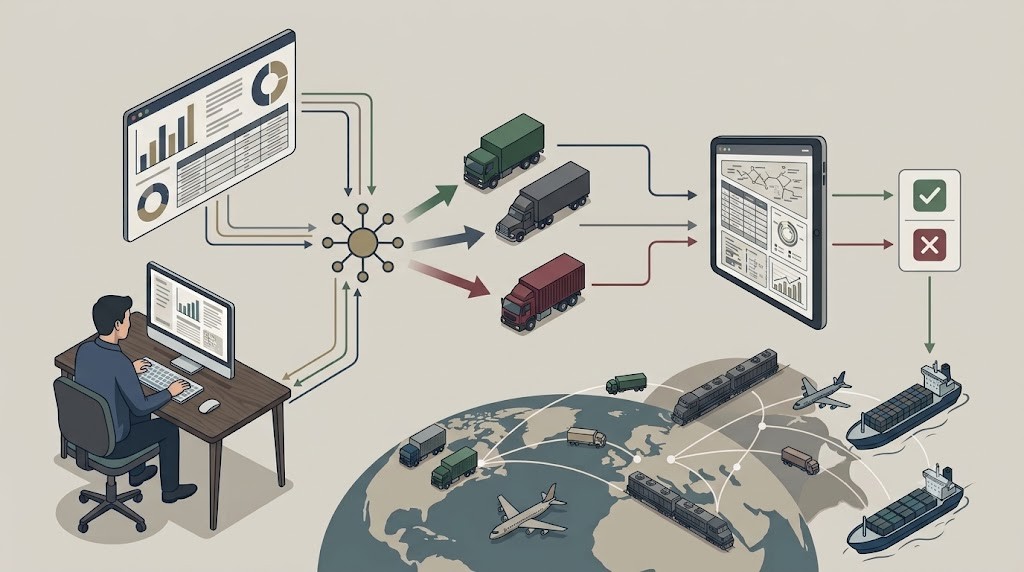
Load tendering is how shippers offer a load to carriers, in priority order, until one accepts it.
Most mid-size shippers still run this by phone and email, because EDI only pencils out at enterprise scale.
Ana, FreightX’s AI tendering agent, automates the whole process: reading your routing guide exactly as it is, auto-waterfalling declines, and escalating only real exceptions — for $1 per tender with no EDI setup required.
Ana is built to fix the bandwidth problem behind manual tendering, not just speed up parts of it.
Before you’ve had your first sip
You open the routing guide before your coffee’s done brewing. It’s 6:52 AM, pickup’s at 9, and the spreadsheet’s got three columns for this lane: primary carrier, backup, and whoever you call when both of those fall through.
You call the primary carrier. It rings four times and drops you into a voicemail greeting you could recite from memory at this point. You hang up, open your email, and draft a note to your backup, because at least email doesn’t feel like yelling into a void. You hit send and you wait. You check Slack. You answer something unrelated. You check your inbox again. Nothing.
By the time your backup finally writes back — a flat, apologetic “no capacity this week” — your coffee’s gone cold and you’re manually crossing them off the list, dialing your third option, and hoping this one picks up before the pickup window starts feeling less like a deadline and more like a threat.
You’ve done this same dance a dozen times this month already, and you’ll do it a dozen more before the month’s out. Doesn’t matter what industry you’re in or what’s on the truck. It’s still you. It’s still this.
Here’s the thing nobody says out loud often enough: tendering is the first promise your company makes to the customer waiting on that order. Before the truck rolls, before the tracking updates, before the delivery confirmation — someone has to actually get a carrier to say yes. Right now, you’re keeping that promise by hand, one phone call and one cold cup of coffee at a time.

What load tendering actually is (and what we mean when we say it)
You know this cold: a tender is your formal offer to a carrier for a load, sent in priority order down your routing guide, until someone accepts it. If your primary carrier declines, you waterfall to your backup, then whoever’s next. If you’re running EDI, that’s a 204 out and a 990 back. If you’re not — and if you’re moving a few hundred loads a month, there’s a good chance you’re not, because EDI-to-every-carrier only pencils out once you’re running serious volume — that’s a phone call, an email, and a manual note about who said what.
You don’t need this explained. What breaks isn’t your grasp of the process — it’s executing it once volume outpaces however many people you have watching the clock for a decline.
And the clock matters more than it feels like in the moment. MIT Center for Transportation & Logistics research, sponsored by C.H. Robinson, found that giving carriers more lead time between tender and pickup measurably raises the odds your top carrier accepts, and that even pushing average lead time out by a day or two lowers cost per load. Every minute a load sits between one call and the next isn’t neutral. It’s lead time your best carrier doesn’t get, and it’s the difference between covering a load at your contracted rate or watching it waterfall onto the spot market.
Why manual tendering breaks down at volume
You already waterfall Plan A to Plan B to Plan C by hand. The question was never whether you know the process. It’s what happens to that process once your load count climbs and you still only have so many people watching the clock for a decline.
Here’s the number that puts a hard edge on that: FreightWaves’ SONAR Outbound Tender Rejection Index (OTRI) tracks exactly how often carriers say no to contracted loads shippers tender them, and it’s been running in the mid-teens percentage nationally through mid-2026.
That means somewhere around one in every six or seven tenders you send gets rejected before you even get to the “waterfall” part of your day. Industry analysis of this data shows that once rejection rates sustain above 10%, contracted carriers start rejecting enough freight that shippers get pushed onto the spot market at a real premium, often 20–30% above the contract rate they’d planned on paying. Declines are the baseline you’re building a process around.
EDI doesn’t fix this for you; it’s not built for your carrier base
EDI doesn’t close that gap for most shippers moving a few hundred loads a month, either. EDI 204/990 automates tendering well once you’ve got the integration budget to run it against your whole carrier base. Most mid-size shippers don’t have that.
Your routing guide lives in a spreadsheet, your carriers live in your phone and inbox, and building EDI out to your secondary and tertiary carriers usually costs more than the lanes are worth. So the gap between “we know the process” and “the process runs itself” doesn’t close. It gets covered, manually, load after load, by whoever’s free to make the next call.
That’s where the real cost shows up, and it’s not just hours:
Decline reasons disappear. A carrier says no over the phone, and unless someone writes down the exact reason — no capacity, rate too low, equipment unavailable — it’s gone. No pattern to learn from, no record if a customer asks why a shipment ran late.
The waterfall only moves as fast as someone notices. A decline doesn’t trigger the next tender by itself. It waits for whoever’s watching that load, and every minute it waits is lead time your next carrier doesn’t get.
None of it gets more efficient with more volume. More loads mean more calls, more inboxes, and more people needed just to keep the clock moving. There’s no version of “call and wait” that scales with your growth.
See how Ana reads your routing guide exactly as it is without reformatting.
Load tendering, status by status

Every load moves through the same five stages before it’s covered, whether that takes one call or five. Here’s where the process actually lives, and where it actually breaks.
1. Routing guide setup
Info needed: Carrier tiers per lane, contracted rates, equipment type, insurance and compliance status, current contacts.
Method: A spreadsheet, maintained by ops or procurement, updated whenever a contract changes.
Your job: Keep it current. Add new carriers as they’re vetted, reorder tiers as performance shifts, update rates as they’re renegotiated.
Common failure: The guide drifts out of date faster than anyone updates it. A carrier who stopped answering calls two months ago is still sitting at the top of the list, and nobody finds out until a load stalls there.
2. Primary tender sent
Info needed: Pickup and delivery details, equipment, rate, response deadline.
Method: A phone call or email to your primary carrier for the lane.
Your job: Reach the right contact, confirm they’ve actually received it, and start the clock on a response.
Common failure: The tender lands with a contact who’s out of office or doesn’t check that inbox often. There’s no read receipt and no way to know it landed until you’re already following up.
3. Response window
Info needed: Accept, decline, or silence.
Method: Waiting on a callback or reply, usually while juggling several other open loads at the same time.
Your job: Watch the clock, follow up if nothing comes back, and log whatever answer you get.
Common failure: Nobody’s watching this specific load closely enough among everything else open. Silence gets read as “still deciding” instead of what it usually is: a decline nobody bothered to send.
4. Waterfall
Info needed: The next carrier in tier order, an updated rate if the lane’s shifted, and whatever the last decline reason tells you about your odds.
Method: Manually restarting the call-and-wait cycle with your backup carrier, then the next one if it comes to that.
Your job: Catch the decline the moment it happens and re-tender immediately, before the lead time you have left shrinks any further.
Common failure: The gap between a decline and the next tender stretches to hours instead of minutes. By the time your backup gets the call, they’ve already committed their capacity somewhere else.
5. Exception: routing guide exhausted
Info needed: A full record of who declined and why, plus your spot market options.
Method: Escalation to a manager or transportation lead, sometimes straight to the load board.
Your job: Decide fast: spot market, a rate bump, or a carrier outside the guide entirely.
Common failure: Nobody realizes the guide is exhausted until the pickup window is already tight, turning what should be a routine exception into a scramble.
Why manual load tendering is expensive
Every hour your team spends chasing a decline is an hour not spent on the shipments that are already moving, or the rate negotiations that would actually lower your freight spend. That math doesn’t stay small for long; a coordinator who spends even a couple of hours a day on carrier chasing is giving up close to half a workweek to a task that doesn’t move a single load forward on its own.
And that’s before you count what happens when a load actually falls through the cracks: a blown delivery window with a retail partner doesn’t just delay a shipment, it can trigger an OTIF chargeback, and that’s on top of whatever spot market premium you just paid to cover the load instead.
You don’t have to take an outside analyst’s word for what this costs in practice, either. Cody Schmidt, corporate purchasing manager at Plastic Ingenuity, saw his own team’s tendering time drop “from three hours to under 15 minutes” after moving off manual tendering. That’s one team, one real switch, and a number you can hold up against your own tendering time to see where you actually stand.
You’re also not early to this. McKinsey’s most recent survey of logistics shippers and service providers found that more than 85% already say their digital investments have added real value to the business. The leaders in this industry have already moved past asking whether automation is worth it.
The question left on the table is which parts of the operation to automate first, and load tendering — high-volume, repetitive, and directly tied to service performance — is usually the easiest place to start.
Here’s the part worth being honest about, though: automation in supply chain has a real trust problem, and it’s not paranoia. Forrester’s own research puts the failure rate of AI-powered supply chain implementations at 72%. That’s a pattern in how most of these tools get built, as black boxes that make decisions you can’t see and can’t explain when a customer or a carrier asks what happened.
That’s exactly why Ana doesn’t work that way: every change you make happens in plain English, in Slack or email, with a confirmation step before anything ships. Every tender, decline, and waterfall gets logged in a full audit trail you can open on any load. The failure mode Forrester is describing is a transparency problem, and transparency is the whole design, not a feature bolted on after the fact.
$1 per tender, no platform fees, no long-term contracts.
How Ana turns tendering into a force multiplier
You’ve already read what breaks when a person has to run every step of the routing guide by hand. Here’s what changes when Ana runs it instead.
1. Bring your routing guide exactly as it is
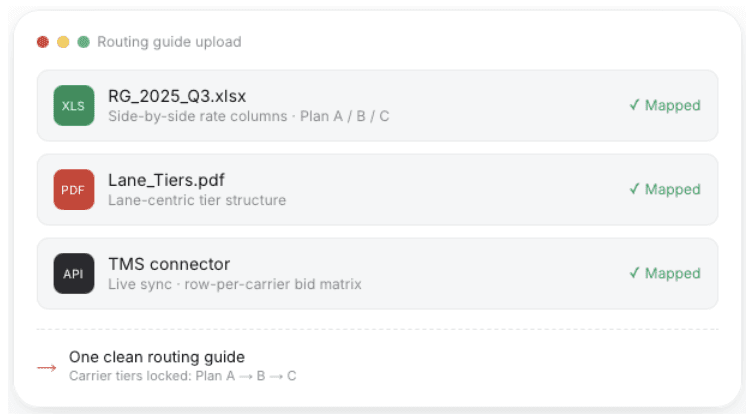
What Ana does: Upload your routing guide in whatever format it already lives in — Excel, PDF, or connect it directly by API. Ana reads it as-is, maps your carrier tiers, and follows the standard operating procedures you’ve already built. No reformatting, no cleanup, no migration project.
Impact: You don’t spend the first month of implementation rebuilding a spreadsheet you’ve already spent years refining. Ana adapts to your routing guide. You don’t adapt to hers.
2. Control everything in plain English
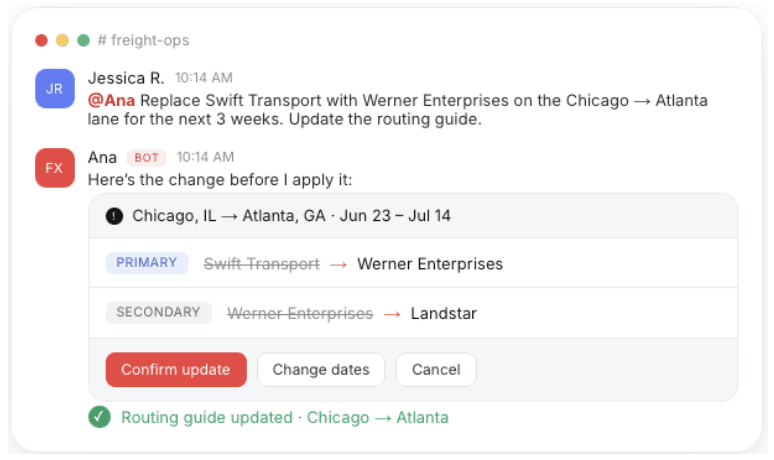
What Ana does: Need to swap a carrier, update a lane, or change a policy? Just tell Ana in plain English, in Slack, Teams, or email. She confirms the change, shows you exactly what she’s about to do, and applies it only after you approve it.
Impact: Changing your routing guide stops being a ticket to your TMS team or a spreadsheet edit someone might forget to save. It’s a conversation, and you can see exactly what’s about to change before it does.
3. Auto-tender and auto-waterfall
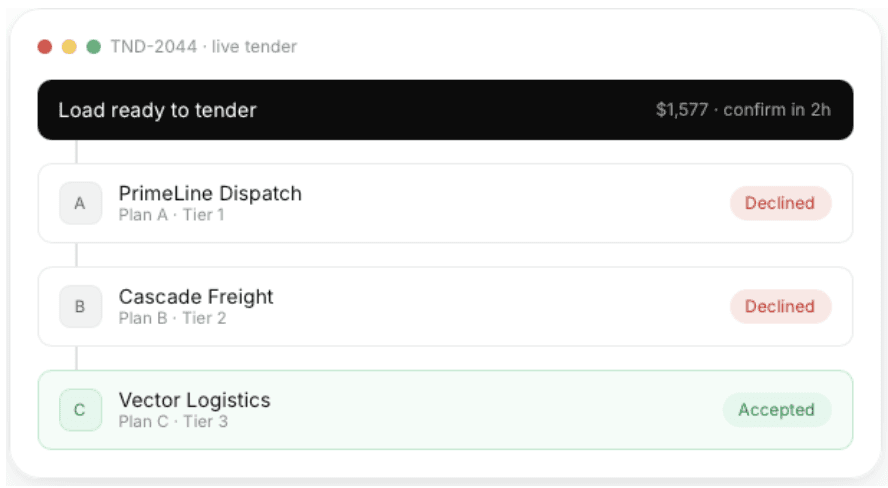
What Ana does: Ana sends the tender, tracks every response, and the moment a carrier declines, she automatically waterfalls to the next carrier in your routing guide without waiting for someone to notice.
Impact: This is the core bandwidth problem, solved directly. The lead time you lose waiting for someone to catch a decline and make the next call goes away. Ana catches it the instant it happens.
4. Catch every exception the moment it happens

What Ana does: When every carrier in your routing guide has declined, Ana flags it immediately, with full context on who declined and why, sent straight to Slack, Teams, or email.
Impact: You stop finding out your routing guide is exhausted only once the pickup window is already tight. You find out the moment it happens, with enough runway to actually do something about it.
5. A complete, auditable trail of every move
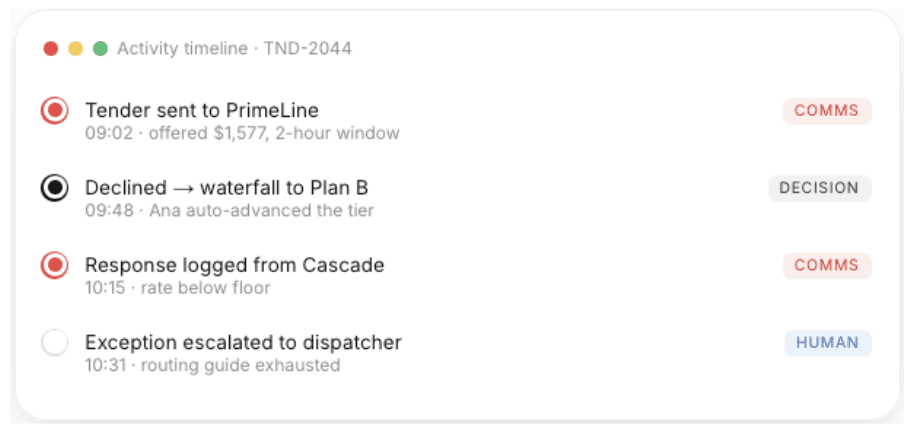
What Ana does: Every tender sent, every decision made, every carrier response — logged and timestamped. Open any load and see exactly what happened and why.
Impact: No more decline reasons that evaporate the second someone hangs up the phone. When a customer asks why a load ran late, or you’re renegotiating with a carrier who’s declining too often, the answer’s already sitting there.
Learn more about how Ana tenders.
The impact: time, trust, margin
Put all of that together, and here’s what actually changes on your side of the routing guide:
Hours back every week. The time your team spent watching the clock for declines and making the next call goes back to sourcing new capacity, negotiating rates, and handling the shipments that actually need a human’s judgment.
Faster time-to-cover, every load. The lead time you lose waiting for someone to notice a decline is exactly the lead time your next carrier needs to say yes. Close that gap, and more of your loads get covered at your contracted rate instead of waterfalling onto the spot market at a premium.
A full audit trail, ready before you need it. Every tender, decline, and waterfall is logged and timestamped automatically. When a customer asks why a load ran late, or you’re deciding whether a carrier’s declining too often to stay in your routing guide, the answer’s already there.
The math holds up. $1 per tender, no platform fees, no long-term contracts, live in under a week, and a proven 5:1 ROI. This isn’t a multi-quarter transformation project. It’s a change you can make this week and measure by next month.
A quick comparison: manual vs. EDI/TMS vs. Ana
Manual (phone/email) | EDI 204/990 (TMS) | Ana (FreightX) | |
|---|---|---|---|
Setup time | None, but no automation either | Weeks to months, per carrier integration | Live in under a week |
Works with your existing routing guide | Yes, as-is | No, requires reformatting into EDI-compatible data | Yes, Excel, PDF, or API, as-is |
Waterfall on decline | Manual, depends on someone noticing | Automatic, but only for carriers you’ve integrated | Automatic, across your whole routing guide |
Exception handling | Ad hoc, whoever’s free picks it up | Rule-based, limited context | Full context, escalated only when it’s a real exception |
Audit trail | Rarely, relies on memory or notes | System logs exist, but aren’t human-readable | Full timestamped trail, readable on any load |
Cost model | Labor cost only, scales with headcount | High upfront integration cost, plus per-carrier setup | $1 per tender, no platform fees |
Best fit for | Low volume, or as a fallback | Enterprise shippers and carriers with integration budget | Mid-size shippers running tendering off a routing guide |
Every tender is a promise
Every tender you send is a small promise: to the carrier making the call on their capacity, and downstream, to the customer waiting on that load. A routing guide is really just a written record of who you trust to keep that promise, and in what order.
Right now, keeping it depends on someone noticing a decline in time, remembering who’s next, and making the call before the window closes. That’s a lot to ask of any one person once volume climbs, and it’s why so much of what looks like a tendering problem is really a bandwidth problem wearing a different name.
Ana makes sure the promise gets kept every time, at every tier, without waiting on whoever happens to be free to notice. Your routing guide runs the way you built it to run. Every decline gets logged. Every waterfall happens the moment it needs to. And when something genuinely needs a person, you’re the first to know about it, not the last.
See it on a real load, not a slide deck.
Frequently asked questions
What is load tendering for a shipper?
A tender is your formal offer to a carrier to haul a specific load. Load tendering is the full process of sending that offer, in priority order down your routing guide, until a carrier accepts it.
What’s the difference between EDI 204 and EDI 990?
EDI 204 is the load tender itself, sent from you to a carrier with pickup and delivery details, equipment type, and rate. EDI 990 is the carrier’s electronic response, accepting, declining, or countering the offer. Every tender-response cycle uses both.
What is a routing guide waterfall?
Waterfalling is what happens when your top carrier for a lane declines a tender: the load automatically drops to the next carrier in your routing guide, then the next, until someone accepts it.
Do you need EDI to automate load tendering?
No. EDI 204/990 works well if you’re a large shipper or enterprise carrier with the integration budget to run it across your whole network. Ana automates tendering directly from the routing guide you already have — Excel, PDF, or API — without requiring EDI setup with every carrier.
How much does load tendering automation cost with Ana?
$1 per tender. No platform fees, no long-term contracts, and no separate implementation project. You only pay for what you actually tender.
What happens when every carrier in the routing guide declines a load?
That’s an exception, not a routine event. Ana flags it immediately, with full context on who declined and why, sent straight to Slack, Teams, or email, so you can decide whether to go to the spot market, adjust the rate, or bring in a carrier outside your guide.


" height="40px" id="cYssIbhED" transform="translate(3.13 2.999)" width="40px"/></svg>)
" width="40px"><path d="M 5.483 6.588 C 5.483 12.827 5.467 13.306 5.22 13.414 C 5.066 13.46 3.83 13.491 2.471 13.476 L 0 13.445 L 0 23.468 L 0 33.491 L 2.703 33.522 L 5.405 33.553 L 5.483 39.777 L 5.56 46.001 L 6.332 45.306 C 7.737 44.04 12.772 39.406 15.691 36.704 C 17.282 35.236 18.656 34.032 18.749 34.032 C 18.873 34.032 18.919 35.731 18.919 39.901 L 18.919 45.769 L 20 45.769 L 21.081 45.769 L 21.081 40.086 C 21.081 36.951 21.127 34.341 21.174 34.294 C 21.236 34.233 21.637 34.511 22.069 34.912 C 22.502 35.298 25.112 37.63 27.876 40.101 C 30.641 42.557 33.189 44.843 33.544 45.167 C 33.9 45.507 34.27 45.769 34.347 45.769 C 34.456 45.769 34.533 43.792 34.548 39.653 L 34.595 33.553 L 37.297 33.522 L 40 33.491 L 40 23.468 L 40 13.429 L 38.224 13.476 C 37.236 13.491 36.247 13.46 36.015 13.414 L 35.598 13.306 L 35.598 6.665 C 35.598 2.541 35.537 0.055 35.459 0.086 C 35.367 0.101 33.9 1.321 32.17 2.789 C 23.181 10.387 21.313 11.916 21.205 11.854 C 21.143 11.808 21.081 9.136 21.081 5.908 L 21.081 0.055 L 20 0.055 L 18.919 0.055 L 18.919 5.924 C 18.919 10.047 18.873 11.792 18.749 11.792 C 18.656 11.792 16.834 10.171 14.703 8.194 C 8.34 2.325 5.946 0.148 5.714 0.009 C 5.514 -0.099 5.483 0.735 5.483 6.588 Z M 8.139 5.198 C 8.247 5.306 10.27 7.159 12.633 9.306 C 15.722 12.117 16.88 13.26 16.726 13.352 C 16.448 13.538 8.247 13.522 7.954 13.337 C 7.768 13.213 7.707 12.611 7.676 9.754 C 7.629 6.696 7.707 4.997 7.876 4.997 C 7.907 4.997 8.031 5.09 8.139 5.198 Z M 33.436 9.09 C 33.436 12.966 33.421 13.182 33.143 13.337 C 32.803 13.507 23.954 13.538 23.506 13.352 C 23.274 13.275 24.216 12.41 28.108 9.121 C 30.795 6.85 33.097 4.997 33.22 4.997 C 33.405 4.997 33.436 5.661 33.436 9.09 Z M 16.973 15.762 C 17.035 15.823 14.471 18.48 11.274 21.677 L 5.483 27.484 L 5.483 29.368 L 5.483 31.252 L 3.861 31.252 L 2.239 31.252 L 2.239 23.561 C 2.239 19.329 2.286 15.808 2.347 15.762 C 2.486 15.623 16.834 15.623 16.973 15.762 Z M 37.73 23.484 L 37.761 31.252 L 36.139 31.252 L 34.517 31.252 L 34.517 29.368 L 34.517 27.484 L 28.726 21.677 C 25.529 18.48 22.981 15.823 23.027 15.762 C 23.089 15.7 26.409 15.669 30.409 15.684 L 37.683 15.731 Z M 18.919 24.132 L 18.919 30.758 L 13.405 35.808 C 7.938 40.796 7.876 40.843 7.753 40.41 C 7.691 40.179 7.676 37.368 7.722 34.186 L 7.815 28.395 L 13.251 22.943 C 16.247 19.962 18.734 17.507 18.795 17.507 C 18.873 17.507 18.919 20.487 18.919 24.132 Z M 26.749 22.943 L 32.201 28.395 L 32.201 34.619 C 32.201 38.511 32.139 40.827 32.046 40.796 C 31.907 40.75 29.22 38.372 23.985 33.677 L 21.081 31.082 L 21.081 24.287 C 21.081 20.565 21.127 17.507 21.189 17.507 C 21.266 17.507 23.768 19.962 26.749 22.943 Z" fill="rgb(0, 0, 0)" height="46.00092789110926px" id="fLr1Rhtnz" transform="translate(0 0)" width="40px"/></g></svg>)
" width="40.00000068043296px"><path d="M 18.603 10.018 C 13.332 15.534 7.84 21.296 6.39 22.827 L 3.751 25.618 L 10.448 20.448 C 14.577 17.254 17.271 15.237 17.468 15.163 C 17.72 15.081 17.87 15.073 18.106 15.139 C 18.611 15.279 18.808 15.501 19.06 16.201 C 20.139 19.164 19.974 22.671 18.603 25.527 C 17.586 27.627 15.561 29.693 13.537 30.697 C 12.118 31.397 10.905 31.693 9.266 31.751 C 7.84 31.8 6.863 31.669 5.468 31.232 L 4.507 30.936 L 2.253 32.031 L 0 33.117 L 0.536 33.488 C 1.276 33.998 2.963 34.838 3.916 35.184 C 8.967 36.995 14.372 35.933 18.5 32.319 C 21.581 29.635 23.464 25.783 23.803 21.477 C 23.929 19.921 23.811 18.489 23.37 16.299 C 22.771 13.286 22.732 11.113 23.252 9.014 C 23.78 6.898 24.749 5.038 27.175 1.498 C 27.743 0.675 28.2 0 28.192 0 C 28.184 0 23.866 4.511 18.603 10.018 Z" fill="rgb(0, 0, 0)" height="36.050172285470616px" id="gP0ghMxXx" transform="translate(11.808 0)" width="28.191968644605325px"/><path d="M 19.813 0.042 C 17.765 0.174 15.59 0.775 13.833 1.689 C 9.815 3.788 6.844 7.764 5.883 12.341 C 5.56 13.848 5.489 14.737 5.536 16.441 C 5.599 18.466 5.867 19.84 6.537 21.651 C 6.954 22.763 7.088 23.454 7.088 24.459 C 7.088 25.825 6.718 27.011 5.867 28.402 C 5.158 29.538 4.756 30.04 2.637 32.419 C 1.415 33.785 0.675 34.65 0.084 35.415 C -0.027 35.555 -0.027 35.564 0.076 35.506 C 0.194 35.432 11.855 24.566 12.36 24.055 L 12.627 23.784 L 12.178 23.273 C 11.493 22.499 10.973 21.693 10.469 20.606 C 9.704 18.968 9.397 17.363 9.476 15.51 C 9.594 12.687 10.658 10.044 12.494 7.978 C 15.44 4.669 20.176 3.434 24.194 4.916 L 24.832 5.155 L 25.636 4.759 C 26.069 4.545 26.613 4.282 26.826 4.183 C 27.046 4.076 27.543 3.837 27.929 3.648 C 28.323 3.459 28.788 3.236 28.977 3.154 C 29.158 3.072 29.308 2.973 29.308 2.948 C 29.308 2.841 28.134 2.1 27.299 1.672 C 25.526 0.767 23.603 0.232 21.586 0.067 C 21.003 0.026 20.452 -0.007 20.365 0.001 C 20.278 0.01 20.034 0.026 19.813 0.042 Z" fill="rgb(0, 0, 0)" height="35.53951920632195px" id="RVpMEhXKC" transform="translate(0 4.46)" width="29.307790905854972px"/></g></svg>)
" width="40px"><path d="M 10.77 0.121 L 10.438 0.234 L 9.821 1.078 L 9.2 1.922 L 9.227 2.199 C 9.262 2.566 9.34 2.957 9.508 3.57 C 9.672 4.176 9.645 4.117 10.247 5.082 C 10.997 6.277 12.986 9.723 14.31 12.109 C 14.97 13.301 15.553 14.34 15.603 14.422 C 15.709 14.586 15.689 14.664 15.518 14.777 L 15.416 14.844 L 15.056 14.555 C 14.857 14.395 13.755 13.57 12.607 12.723 C 11.458 11.879 9.743 10.586 8.797 9.855 C 5.875 7.598 6.011 7.695 5.792 7.633 C 5.683 7.602 5.273 7.559 4.882 7.531 C 4.3 7.492 4.159 7.492 4.108 7.535 C 4.073 7.562 3.819 7.836 3.546 8.137 L 3.046 8.687 L 3.175 9.52 C 3.249 9.98 3.331 10.387 3.358 10.422 C 3.784 11.012 3.917 11.145 4.441 11.492 C 4.73 11.687 5.515 12.242 6.179 12.727 C 6.847 13.207 8.297 14.203 9.403 14.934 C 11.927 16.598 15.541 19.047 15.764 19.242 C 15.928 19.387 15.928 19.395 15.885 19.523 L 15.838 19.652 L 15.385 19.633 C 15.135 19.625 14.087 19.523 13.056 19.414 C 11.899 19.293 10.567 19.18 9.579 19.117 C 7.535 18.996 2.487 18.648 1.577 18.57 L 0.881 18.512 L 0.479 18.781 C 0.076 19.055 0.072 19.055 0.049 19.242 C 0.033 19.344 0.014 19.477 0.002 19.531 C -0.014 19.613 0.057 19.727 0.381 20.156 C 0.6 20.445 0.807 20.711 0.842 20.746 C 0.877 20.785 1.088 20.852 1.358 20.91 C 1.741 20.996 2.085 21.023 3.604 21.109 C 6.011 21.238 9.723 21.391 11.923 21.441 C 12.911 21.465 14.138 21.512 14.65 21.543 C 15.162 21.574 15.615 21.598 15.654 21.598 C 15.697 21.598 15.756 21.645 15.783 21.699 C 15.83 21.789 15.83 21.828 15.771 21.973 C 15.736 22.066 15.693 22.16 15.67 22.18 C 15.65 22.199 13.869 23.207 11.708 24.418 L 7.781 26.621 L 6.257 27.668 C 5.398 28.258 4.636 28.812 4.511 28.934 L 4.284 29.156 L 4.23 29.781 C 4.179 30.355 4.179 30.41 4.237 30.469 C 4.276 30.5 4.456 30.672 4.644 30.852 L 4.98 31.176 L 5.929 31.051 L 6.879 30.93 L 12.146 27.512 C 15.041 25.633 17.436 24.086 17.467 24.074 C 17.506 24.059 17.526 24.094 17.538 24.191 C 17.553 24.324 17.514 24.379 16.776 25.238 C 16.35 25.734 15.486 26.812 14.861 27.629 C 14.236 28.449 12.798 30.293 11.669 31.734 C 10.536 33.176 9.461 34.57 9.278 34.84 L 8.946 35.328 L 8.899 35.781 C 8.828 36.504 8.77 36.398 9.45 36.738 L 10.044 37.035 L 10.403 36.887 L 10.762 36.734 L 12.185 35.211 L 13.607 33.687 L 15.443 31.207 C 16.451 29.844 17.807 28.004 18.448 27.117 C 19.444 25.754 19.636 25.508 19.729 25.496 C 19.788 25.484 19.847 25.492 19.858 25.512 C 19.87 25.527 19.815 25.781 19.737 26.07 C 19.647 26.418 19.511 27.164 19.347 28.25 C 19.21 29.156 19.069 30.031 19.034 30.191 C 18.999 30.352 18.725 31.68 18.428 33.141 C 18.131 34.602 17.78 36.289 17.647 36.887 L 17.409 37.98 L 17.674 38.602 L 17.94 39.223 L 18.452 39.609 L 18.964 40 L 19.573 39.762 L 20.183 39.523 L 20.437 39.223 C 20.644 38.98 20.695 38.895 20.71 38.746 C 20.726 38.648 20.972 36.004 21.261 32.867 C 21.55 29.73 21.796 27.082 21.812 26.98 C 21.832 26.828 21.851 26.793 21.949 26.754 C 22.011 26.727 22.07 26.711 22.078 26.719 C 22.082 26.727 22.511 27.457 23.027 28.336 C 24.199 30.332 25.969 33.047 27.474 35.156 C 28.095 36.023 28.603 36.738 28.603 36.742 C 28.607 36.742 28.861 36.793 29.173 36.848 L 29.74 36.953 L 30.228 36.781 L 30.716 36.609 L 30.869 36.32 L 31.021 36.035 L 30.92 35.117 L 30.818 34.199 L 28.493 30.715 C 26.024 27.02 26.004 26.988 26.282 26.988 C 26.383 26.988 26.649 27.195 27.876 28.227 C 28.685 28.91 29.728 29.797 30.189 30.199 C 30.728 30.668 31.674 31.414 32.826 32.281 C 33.815 33.027 34.647 33.648 34.682 33.668 C 34.714 33.684 34.858 33.711 34.999 33.727 L 35.261 33.754 L 35.522 33.391 C 35.815 32.977 35.808 33.039 35.655 32.387 L 35.577 32.035 L 33.303 29.93 C 32.053 28.77 30.38 27.234 29.583 26.52 C 28.79 25.801 27.712 24.805 27.192 24.297 C 26.395 23.527 26.243 23.363 26.243 23.27 C 26.243 23.172 26.258 23.16 26.364 23.16 C 26.426 23.16 27.04 23.301 27.72 23.473 C 28.4 23.641 30.959 24.258 33.401 24.836 L 37.843 25.891 L 38.851 25.375 L 39.859 24.859 L 39.93 24.457 L 40 24.051 L 39.598 23.512 L 39.195 22.977 L 38.558 22.555 C 38.211 22.324 37.894 22.129 37.855 22.121 C 37.82 22.113 36.726 22.023 35.429 21.93 C 33.276 21.77 32.948 21.754 31.658 21.754 C 30.048 21.75 29.548 21.727 27.747 21.555 C 26.532 21.441 26.34 21.406 26.43 21.316 C 26.505 21.242 32.092 19.957 33.959 19.582 C 35.136 19.348 36.691 19 37.656 18.762 L 39.316 18.352 L 39.59 17.68 L 39.863 17.008 L 39.793 16.695 C 39.754 16.523 39.699 16.363 39.672 16.34 C 39.644 16.316 39.332 16.164 38.976 16 L 38.328 15.699 L 36.847 15.953 C 34.096 16.426 32.756 16.68 30.365 17.187 C 29.056 17.465 27.899 17.703 27.802 17.715 C 27.638 17.738 27.61 17.73 27.556 17.641 C 27.493 17.547 27.501 17.527 28.153 16.41 C 28.747 15.387 28.915 15.137 29.822 13.914 C 30.959 12.387 32.025 10.996 33.205 9.504 C 33.643 8.949 34.042 8.437 34.085 8.375 C 34.131 8.309 34.295 7.832 34.444 7.309 L 34.721 6.359 L 34.088 5.422 L 33.455 4.488 L 32.588 4.488 L 31.717 4.488 L 31.256 4.855 C 30.791 5.227 29.931 6.109 28.763 7.418 C 28.083 8.18 25.688 11.168 24.66 12.535 C 24.231 13.105 23.77 13.687 23.629 13.832 C 23.394 14.082 23.367 14.098 23.207 14.098 C 23.117 14.098 23.039 14.086 23.039 14.07 C 23.039 14.023 23.684 10.613 24.148 8.187 C 24.399 6.883 24.719 5.074 24.875 4.035 L 25.16 2.195 L 24.758 1.617 L 24.356 1.043 L 23.871 0.812 L 23.387 0.586 L 22.758 1.004 L 22.125 1.422 L 21.82 2.164 C 21.456 3.043 21.503 2.734 21.179 6.48 C 21.062 7.844 20.89 9.637 20.792 10.465 C 20.698 11.293 20.562 12.711 20.491 13.617 L 20.366 15.27 L 20.257 15.27 C 20.112 15.27 20.073 15.176 19.78 14.176 L 19.558 13.414 L 17.885 10.152 C 16.182 6.832 15.553 5.508 14.013 1.969 C 13.501 0.785 13.509 0.801 12.978 0.363 L 12.798 0.219 L 12.009 0.109 C 11.575 0.047 11.192 0 11.161 0 C 11.13 0 10.954 0.055 10.77 0.121 Z" fill="rgb(0, 0, 0)" height="40px" id="CBBXwju23" transform="translate(0 0)" width="40px"/></g></svg>)